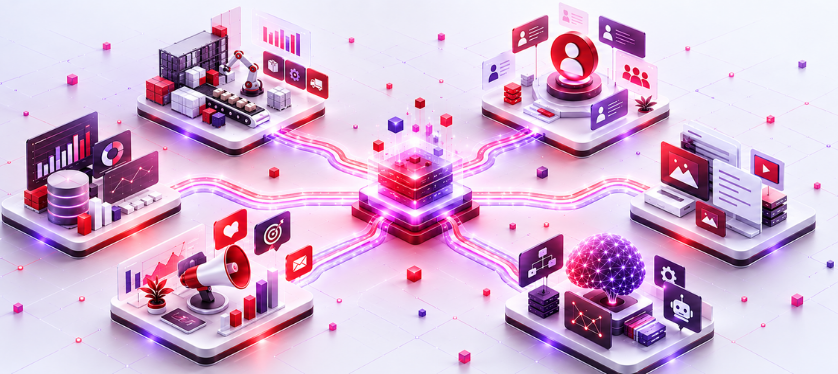
Orchestration des données banner.jpg

Data orchestration: unify your tools to get more out of your AI

User avatar
By K.C .
Responsable Développement Digital et Évènementiel
Businesses have never used so many tools – from ERP to CRM – without, however, ensuring they communicate more effectively with one another. MuleSoft’s 2026 Barometer reports 957 applications per organisation, of which only 27 per cent are actually connected to one another.

The real problem isn’t the number of applications: it’s that they don’t talk to one another. This has become a critical issue at a time when businesses are looking to integrate AI into their operations.
Published on, 25 Sept 2026

What is data orchestration?

Data orchestration is the automated coordination of data flows between a company’s systems. It determines which data is transferred, in what order, at what time and under what conditions. It is the control layer that enables tools designed to operate separately to work together. 

The analogy speaks for itself: in an orchestra, every musician knows their part, but without a conductor to give the cues and set the tempo, all you get is noise. Orchestration plays this role: it does not produce the data, but ensures that each system receives and transmits it at the right time. 

It is often confused with integration, which connects two systems to exchange information (such as sending an order from the website tothe ERP system ). Orchestration involves managing all these links and their dependencies: refreshing the customer database before recalculating stock levels, republishing a product listing once it has been approved, or resuming a process that failed overnight. Integration transfers the data; orchestration determines and monitors its path. 

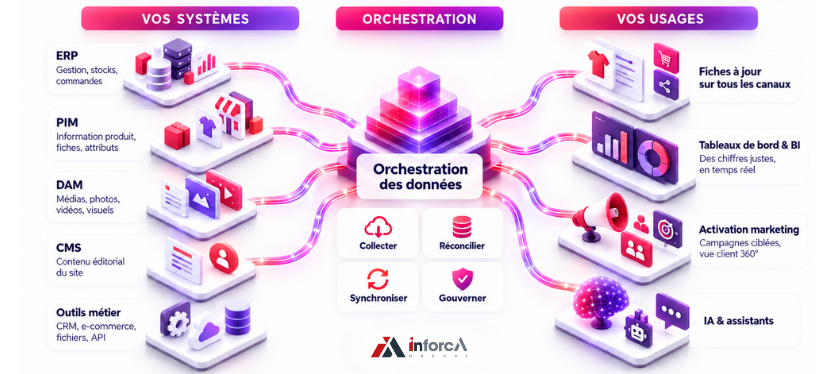
Orchestration des données - Inforca.png

The real problem: data silos

What does it actually mean in practice when these applications don’t communicate with one another? 

• A sales team re-entering information into their system that’s already available elsewhere. 

• Stock shown as available on the website even though it has been out of stock for the past two hours. 

• Turnover figures that vary depending on whether you’re looking at the accounts or the marketing dashboard. 

Eventually, each department ends up with its own version of the truth, and nobody has the full picture anymore. This fragmentation comes at a cost. Gartner estimated it at an average of $12.9 million per year per organisation for poor data quality alone. Most of the waste stems from small, accumulated friction points: the time spent reconciling, correcting and questioning the figures right in front of them. For a CIO, it’s a question of architecture; for e-commerce or marketing, it’s a daily reality: incorrect customer records, poorly targeted campaigns, customers contacted three times. 

Orchestration, ETL, automation: don’t get them mixed up

Several terms revolve around this subject; distinguishing between them helps to define orchestration. 

Integration connects two systems so that they can exchange data: a point-to-point link. 

ETL ( extract, transform, load), and its variant ELT ( where data is loaded first and then transformed at the destination, often in the cloud), describe how data is prepared: a type of processing, generally organised as a pipeline. 

An iPaaS is a cloud platform that provides ready-to-use connectors to link your applications together, without having to redevelop everything. 

Automation triggers a repetitive action on its own, such as running a script every night. Scheduling goes a step further: it plans the execution of tasks at fixed times, like a calendar. Observability monitors the status of data flows and identifies anomalies. And ingestion is just the first step: bringing the data in. 

Orchestration sits above all these building blocks. It does not replace them: it decides which processing steps to run, in what order and at what time, chains together the automations and relies on observability to take control in the event of a problem. 


How it works, from data collection to usage

An orchestrated data flow always follows the same process. The data is first collected at its source: an ERP system, a website, a supplier file or an API. It is then transformed: it is cleaned, deduplicated and standardised, and the ‘customer Dupont’—who existed in three different versions—is reconciled. Finally, it is made available to users, ready for immediate use: a dashboard, the website, a marketing tool or an AI model. 

Throughout this process, an orchestrator pulls everything together. It automates the execution of each task, manages dependencies and takes control when a process fails. It models the workflow as a directed acyclic graph (DAG), where each task only starts once its dependencies have been satisfied, allowing independent tasks to run in parallel. It also handles monitoring: when the overnight processing fails, an alert is triggered and a recovery process is initiated, rather than the problem only being discovered at midday. 

Some workflows run in batches at night, when data freshness is not a concern; others run in real time, when stock levels or customisation cannot wait. Most architectures combine both approaches.

What tools can you use to organise and manage your data?

Your data isn’t stored in just one place: it’s spread across several families of tools, each specialising in a particular type of information. Looking at them as a whole sheds light on what the orchestration connects. 


YOUR SYSTEMS: ORCHESTRATION FOR YOUR USES 
Orchestration des données - Inforca 2.png

Understanding the role of each component

To organise your data effectively, you first need to know where it is created, stored and enriched. Each tool fulfils a specific need and then feeds into the other systems.

Tool What it contains  Its purpose What you get out of it
ERP 

Management: stock, 

orders, invoicing, accounts

A single source of truth for managing the business

Reliable operations, with accounting and logistics 

that are always up to date

PIM Product information: descriptions, attributes, variantsCentralises and enriches product records for all channelsConsistent product records across the board, faster time-to-market
DAM Media: photos, videos, visualsManages and distributes large filesUp-to-date visuals, reusable across all media
CMS Website editorial content Publishes and organises web contentA website updated without the need for re-entry
CDP Unified customer data: behaviour, purchasesBrings together customer data from all sourcesA 360° view of the customer, which can be activated for campaigns
MDM Master data: customers, products, suppliersEnsures a single version of the truthNo more duplicates or conflicting data

Data warehouse 

/ BI

Consolidated analytical dataBrings data together for analysisReliable dashboards, decisions based on accurate figures

Orchestrator / 

iPaaS

Data flows between all these systemsCoordinates, synchronises and monitors data exchangesData entered once, consistent and up-to-date everywhere, ready for AI

The first seven families hold the data; the orchestrator is what makes them work together, at the right time and in the right order. 

In terms of pure orchestration, the market has developed around open-source solutions: Apache Airflow, which has become the standard, and its more recent alternatives, Prefect and Dagster. Cloud integration platforms, or iPaaS, also include their own orchestration modules. Our role is not to sell you one of these, but to orchestrate the one that makes sense for your existing setup. 

What orchestration actually changes

Once the data flows have been orchestrated, the benefits quickly become apparent: 

• Reliable data: entered once and then reconciled, it remains consistent across systems; data quality is no longer a constant struggle. 

• Real-time decision-making: dashboards and analyses are based on up-to-date figures, not on exports from last week. 

• Fewer wasted resources: automating repetitive tasks, from collection to transformation, eliminates the need for re-entry and manual corrections, allowing teams to focus on their core work. 

• Greater control: access, traceability and security of data flows are centralised, which aids compliance. 

• Actionable AI: fresh, governed data, ready to feed into a model without causing it to go off track. 


Orchestration: the foundation of your AI projects

AI only knows the data it is given. When you connect an assistant or a recommendation engine to a company’s systems, its responses are never better than what it reads. The problem takes three forms: 

• Out-of-date data: it quotes a price that no longer exists. 

• Contradictory data: it gives different answers to the same question depending on the day. 

• Missing data: it fills the gap by inventing a plausible but false answer. 

This vulnerability is exacerbated with AI systems connected in real time. An assistant that retrieves your data whilst responding (RAG), or an AI agent that initiates actions itself, is only as good as the freshness and consistency of the data it reads. 

The figures confirm this. Gartner predicts that at least 30 per cent of generative AI projects will be abandoned after the testing phase, citing poor data quality as the main reason. S&P Global notes that the proportion of companies that have abandoned the majority of their AI initiatives has risen from 17 per cent to 42 per cent in one year. And 82 per cent of IT managers (MuleSoft) cite data integration as one of the biggest obstacles to their AI projects. The bottleneck isn’t the model: it’s the data underneath it. 

Orchestration is a game-changer, though it’s no magic bullet. It doesn’t make AI intelligent: it simply provides it with usable raw material – fresh, reconciled, governed data that is available exactly where the model needs it. 

Behind this clean data lies governance: knowing who owns which data, tracing its origin, keeping its metadata up to date, and monitoring its quality over time. This is the realm of MDM, quality assurance and DataOps – areas that orchestration sets in motion without replacing them. Added to this is a key challenge in Europe: access security and data sovereignty – knowing where data is hosted and who can access it, in accordance with the GDPR. 
Orchestration in practice: three examples

In e-commerce, the same product must display the correct price and stock levels on the website, marketplaces and mobile app, in real time. Data orchestration synchronises data between the ERP, the product repository and the sales channels, ensuring that no order is placed for an out-of-stock item. 

In retail and manufacturing, production, logistics and procurement data are stored in different systems. Orchestrating them allows stock levels and forecasts to be recalculated as events unfold, rather than the day before for the following day. 

In the service sector, customer data is scattered across the website, invoicing systems and customer relationship management tools. By bringing this data together, a complete customer journey is reconstructed, which feeds into both marketing and management dashboards. 

Co-ordinating an existing information system

Most content on this subject assumes that we are starting from scratch. In practice, a company already has an ERP system, often a product repository, a CMS for its website, sometimes a customer data platform, and business tools accumulated over the years. The challenge is not to replace everything, but to get these existing systems to work together. 

This is the approach we advocate at Inforca: remaining agnostic. We orchestrate the tools you already have – whether off-the-shelf or bespoke – and we build the missing piece where it doesn’t exist, integrated into your infrastructure as it stands. Whether on the product side or the customer side, the difference lies not in yet another piece of software, but in the orchestration that links these systems to maintain consistency with every change and reconstruct a customer journey that can be activated through campaigns. 

The difficulties in anticipating

Setting up an information system is no magic bullet: it’s best to be aware of the obstacles. 

Legacy systems, which are sometimes closed or poorly documented, are the most complex to integrate. Access governance requires deciding who can see what, which is a genuine security concern. Technical debt, consisting of makeshift connections and scripts that nobody understands any more, leads to errors that are difficult to trace. Finally, all of this requires skills and resources that an in-house team does not always possess. This is where support and continuous monitoring of data flows can save time. 

None of this is insurmountable, but it is all the more reason to start with an audit rather than embarking on a major project without a clear plan. 

Where to start

The starting point is almost always an audit of data flows and workflows: where the data resides, how it moves or gets stuck, how it is transformed, and where duplicate entries and inconsistencies lurk. This snapshot reveals a number of priority areas for improvement, often quick wins that fund the next stages. 

A question soon arises: should you build your own data orchestration or rely on an existing solution? It depends on the size of your catalogue, the number of systems to be connected and your in-house expertise. An audit provides a clearer answer than any preconception. 

If you recognise your organisation in these symptoms (repeated re-entry of data, figures that don’t add up, AI that goes haywire as soon as it’s connected to your data), now is the right time to take stock. 

FAQ

What is the difference between data orchestration and data integration?

Integration links two systems so that they can exchange information. Orchestration coordinates all of these exchanges: sequence, dependencies, triggering processes at the right time, and monitoring. Integration is a link in the chain; orchestration manages the chain. 

Orchestration or automation: what’s the difference?

Automation carries out a repetitive task on its own. Orchestration coordinates a set of automations and processes, managing their order, dependencies and monitoring. One is a building block; the other is the conductor. 

What is the difference between scheduling and orchestration?

Scheduling plans tasks at fixed times, much like a calendar that runs a process every night. Orchestration goes a step further: it manages dependencies and conditions between tasks, adapts to events and takes control again in the event of a failure. A scheduler follows the clock; an orchestrator follows the logic of workflows.

Data orchestration and ETL – are they the same thing?

No. ETL (extract, transform, load) is a way of preparing data: a task, or a type of task. Orchestration sequences and monitors this task and all the others (ingestion, quality checks, synchronisation, distribution). It sits above the ETL process. 

What is a data pipeline?

A pipeline is a sequence of steps that takes data from its source to a usable destination, via stages of collection, transformation and loading. Orchestration coordinates multiple pipelines and manages their dependencies.

Is it necessary to implement an orchestration solution if you already have an ERP or a customer data platform?

Yes, because each of these tools manages its own scope without communicating with the rest. Orchestration enables them to communicate and ensures that the same data remains consistent across systems. 

Is orchestration only for large companies?

No. As soon as an SME uses several tools that need to share data (an ERP system, a website, a marketing tool), the question arises. Modern approaches, often cloud-based, make this possible without having to involve the entire IT department.